Key Features
-
Supports transmitter tests defined in IEEE 802.3cg (10Base-T1S, 10Base-T1L) and in Open Alliance PMA (10Base-T1S)
-
Single, unified tree‑view interface for all settings, test selection, and pass/fail results
-
Quick, always‑available access to connection diagrams directly in the test tree
-
Integrated Results Database to analyze, filter, and review results before generating reports
-
Easily retest individual measurements or remove older results from the database
-
Session Manager for working efficiently across multiple projects
-
Take your test session offline with QPHY2‑PC and free the oscilloscope for other tasks
-
Built‑in report generator creates complete, standards‑aligned reports with all relevant test data
Automated Compliance Testing

Clear connection diagrams ensure correct hardware setup and indicate the required test pattern for each measurement, with quick access at any time through the test tree. After the test session, QualiPHY2 automatically compiles all results—including annotated screenshots—into a complete, standards aligned compliance report.
Flexible Debug Environment
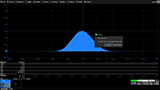
QualiPHY2’s Pause on Failure mode lets users pause execution after any individual test to inspect results in detail. At this point, all oscilloscope analysis tools—cursors, math functions, serial decode, spectral analysis, and more—remain fully accessible for deep‑dive debugging. Once the review is complete, testing resumes seamlessly at the press of a button, ensuring a smooth transition between compliance testing and root‑cause analysis.
On Time, From Anywhere

QPHY2‑PC extends the power of QualiPHY2 beyond the lab by shifting all non‑acquisition tasks to a remote computer, allowing teams to stay productive even when the oscilloscope is needed for other work. By enabling full waveform post‑processing in Analysis‑Only mode, QPHY2‑PC helps keep projects on schedule while maximizing valuable bench time. Test sessions can be opened directly on the remote PC for continued execution, with all waveform analysis performed offline using MAUI® Studio, SDA Expert, or third‑party tools. Once processing is complete, measurements, margins, and pass/fail results are automatically added to the QualiPHY2 Results Database—ready for review or reporting.
Powerful Results Database for Fast Review and Reporting
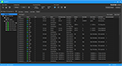
The QualiPHY2 Results Database puts all measurement outcomes instantly at your fingertips, making it easy to review test behavior across multiple runs. Every test is indexed by run number and displayed in a sortable, filterable table that helps you quickly locate the data you need. For deeper analysis, the full results table can be exported to .csv format. When generating reports, you can choose exactly what to include—compile All test runs, select Best or Worst cases under varying conditions, or output only the Last run when finalizing compliance results on a golden device.